
").attr(n.scriptAttrs||{}).prop({charset:n.scriptCharset,src:n.url}).on("load error",i=function(e){r.remove(),i=null,e&&t("error"===e.type?404:200,e.type)}),C.head.appendChild(r[0])},abort:function(){i&&i()}}});var Jt,Kt=[],Zt=/(=)\?(?=&|$)|\?\?/;ce.ajaxSetup({jsonp:"callback",jsonpCallback:function(){var e=Kt.pop()||ce.expando+"_"+jt.guid++;return this[e]=!0,e}}),ce.ajaxPrefilter("json jsonp",function(e,t,n){var r,i,o,a=!1!==e.jsonp&&(Zt.test(e.url)?"url":"string"==typeof e.data&&0===(e.contentType||"").indexOf("application/x-www-form-urlencoded")&&Zt.test(e.data)&&"data");if(a||"jsonp"===e.dataTypes[0])return r=e.jsonpCallback=v(e.jsonpCallback)?e.jsonpCallback():e.jsonpCallback,a?e[a]=e[a].replace(Zt,"$1"+r):!1!==e.jsonp&&(e.url+=(At.test(e.url)?"&":"?")+e.jsonp+"="+r),e.converters["script json"]=function(){return o||ce.error(r+" was not called"),o[0]},e.dataTypes[0]="json",i=ie[r],ie[r]=function(){o=arguments},n.always(function(){void 0===i?ce(ie).removeProp(r):ie[r]=i,e[r]&&(e.jsonpCallback=t.jsonpCallback,Kt.push(r)),o&&v(i)&&i(o[0]),o=i=void 0}),"script"}),le.createHTMLDocument=((Jt=C.implementation.createHTMLDocument("").body).innerHTML="
",2===Jt.childNodes.length),ce.parseHTML=function(e,t,n){return"string"!=typeof e?[]:("boolean"==typeof t&&(n=t,t=!1),t||(le.createHTMLDocument?((r=(t=C.implementation.createHTMLDocument("")).createElement("base")).href=C.location.href,t.head.appendChild(r)):t=C),o=!n&&[],(i=w.exec(e))?[t.createElement(i[1])]:(i=Ae([e],t,o),o&&o.length&&ce(o).remove(),ce.merge([],i.childNodes)));var r,i,o},ce.fn.load=function(e,t,n){var r,i,o,a=this,s=e.indexOf(" ");return-1").append(ce.parseHTML(e)).find(r):e)}).always(n&&function(e,t){a.each(function(){n.apply(this,o||[e.responseText,t,e])})}),this},ce.expr.pseudos.animated=function(t){return ce.grep(ce.timers,function(e){return t===e.elem}).length},ce.offset={setOffset:function(e,t,n){var r,i,o,a,s,u,l=ce.css(e,"position"),c=ce(e),f={};"static"===l&&(e.style.position="relative"),s=c.offset(),o=ce.css(e,"top"),u=ce.css(e,"left"),("absolute"===l||"fixed"===l)&&-1<(o+u).indexOf("auto")?(a=(r=c.position()).top,i=r.left):(a=parseFloat(o)||0,i=parseFloat(u)||0),v(t)&&(t=t.call(e,n,ce.extend({},s))),null!=t.top&&(f.top=t.top-s.top+a),null!=t.left&&(f.left=t.left-s.left+i),"using"in t?t.using.call(e,f):c.css(f)}},ce.fn.extend({offset:function(t){if(arguments.length)return void 0===t?this:this.each(function(e){ce.offset.setOffset(this,t,e)});var e,n,r=this[0];return r?r.getClientRects().length?(e=r.getBoundingClientRect(),n=r.ownerDocument.defaultView,{top:e.top+n.pageYOffset,left:e.left+n.pageXOffset}):{top:0,left:0}:void 0},position:function(){if(this[0]){var e,t,n,r=this[0],i={top:0,left:0};if("fixed"===ce.css(r,"position"))t=r.getBoundingClientRect();else{t=this.offset(),n=r.ownerDocument,e=r.offsetParent||n.documentElement;while(e&&(e===n.body||e===n.documentElement)&&"static"===ce.css(e,"position"))e=e.parentNode;e&&e!==r&&1===e.nodeType&&((i=ce(e).offset()).top+=ce.css(e,"borderTopWidth",!0),i.left+=ce.css(e,"borderLeftWidth",!0))}return{top:t.top-i.top-ce.css(r,"marginTop",!0),left:t.left-i.left-ce.css(r,"marginLeft",!0)}}},offsetParent:function(){return this.map(function(){var e=this.offsetParent;while(e&&"static"===ce.css(e,"position"))e=e.offsetParent;return e||J})}}),ce.each({scrollLeft:"pageXOffset",scrollTop:"pageYOffset"},function(t,i){var o="pageYOffset"===i;ce.fn[t]=function(e){return M(this,function(e,t,n){var r;if(y(e)?r=e:9===e.nodeType&&(r=e.defaultView),void 0===n)return r?r[i]:e[t];r?r.scrollTo(o?r.pageXOffset:n,o?n:r.pageYOffset):e[t]=n},t,e,arguments.length)}}),ce.each(["top","left"],function(e,n){ce.cssHooks[n]=Ye(le.pixelPosition,function(e,t){if(t)return t=Ge(e,n),_e.test(t)?ce(e).position()[n]+"px":t})}),ce.each({Height:"height",Width:"width"},function(a,s){ce.each({padding:"inner"+a,content:s,"":"outer"+a},function(r,o){ce.fn[o]=function(e,t){var n=arguments.length&&(r||"boolean"!=typeof e),i=r||(!0===e||!0===t?"margin":"border");return M(this,function(e,t,n){var r;return y(e)?0===o.indexOf("outer")?e["inner"+a]:e.document.documentElement["client"+a]:9===e.nodeType?(r=e.documentElement,Math.max(e.body["scroll"+a],r["scroll"+a],e.body["offset"+a],r["offset"+a],r["client"+a])):void 0===n?ce.css(e,t,i):ce.style(e,t,n,i)},s,n?e:void 0,n)}})}),ce.each(["ajaxStart","ajaxStop","ajaxComplete","ajaxError","ajaxSuccess","ajaxSend"],function(e,t){ce.fn[t]=function(e){return this.on(t,e)}}),ce.fn.extend({bind:function(e,t,n){return this.on(e,null,t,n)},unbind:function(e,t){return this.off(e,null,t)},delegate:function(e,t,n,r){return this.on(t,e,n,r)},undelegate:function(e,t,n){return 1===arguments.length?this.off(e,"**"):this.off(t,e||"**",n)},hover:function(e,t){return this.on("mouseenter",e).on("mouseleave",t||e)}}),ce.each("blur focus focusin focusout resize scroll click dblclick mousedown mouseup mousemove mouseover mouseout mouseenter mouseleave change select submit keydown keypress keyup contextmenu".split(" "),function(e,n){ce.fn[n]=function(e,t){return 0
【アクションカメラ】FIREFLY 8SEのかんたん設定方法!写真モード編
アクションカム
2019.06.28

アクションカメラ「Hawkeye Firefly 8SE」の写真カメラ設定方法についてです。設定は、大まかに言うと本体の設定と動画(ビデオカメラ)設定と写真(カメラ)設定の3つあります。今回はFirefly 8SEの写真設定の方法を個人的に備忘録としてメモしておきたいと思います。
スポンサードリンク
アクションカメラ「Hawkeye Firefly 8SE」写真カメラの設定方法
「Firefly 8SE」のボタンについて
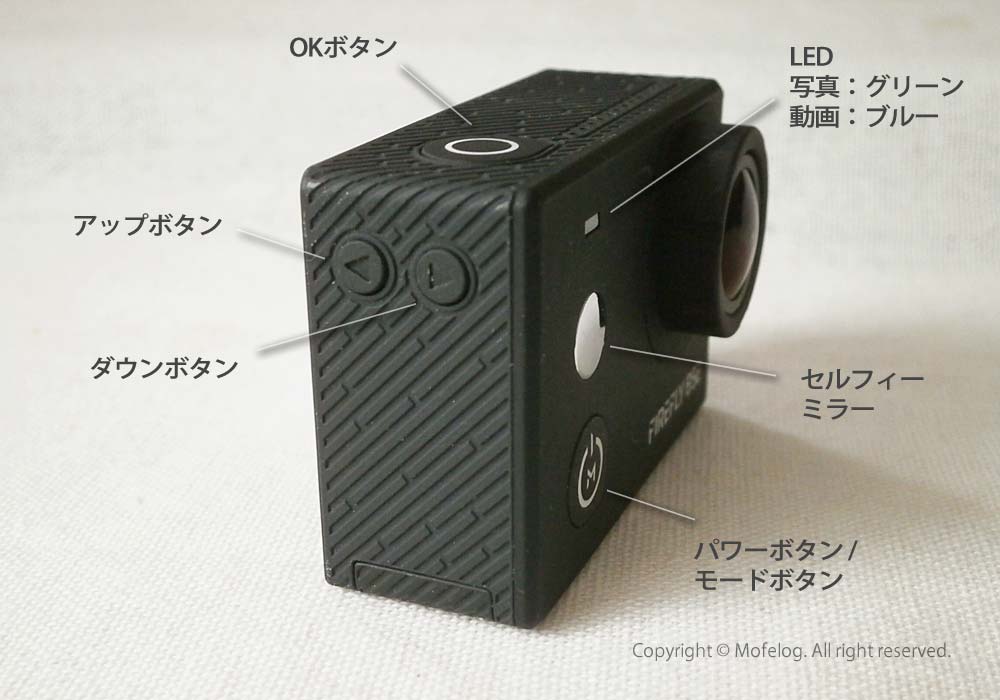
設定の際に使うボタンなどについては下の写真のとおりです。アップボタンやダウンボタンを使いながら、OKボタンで「決定」、パワーボタンで「戻る」などの使い方になります。
写真設定画面の表示方法
まず電源を入れます。そのあとの手順は、ふた通りあるのですが、ひとつは電源を入れた後、ダウンボタン(レンズ側のボタン)を押すと裏面のタッチパネルが、その時点でのモード「写真」または「動画」設定の画面メニューになります。
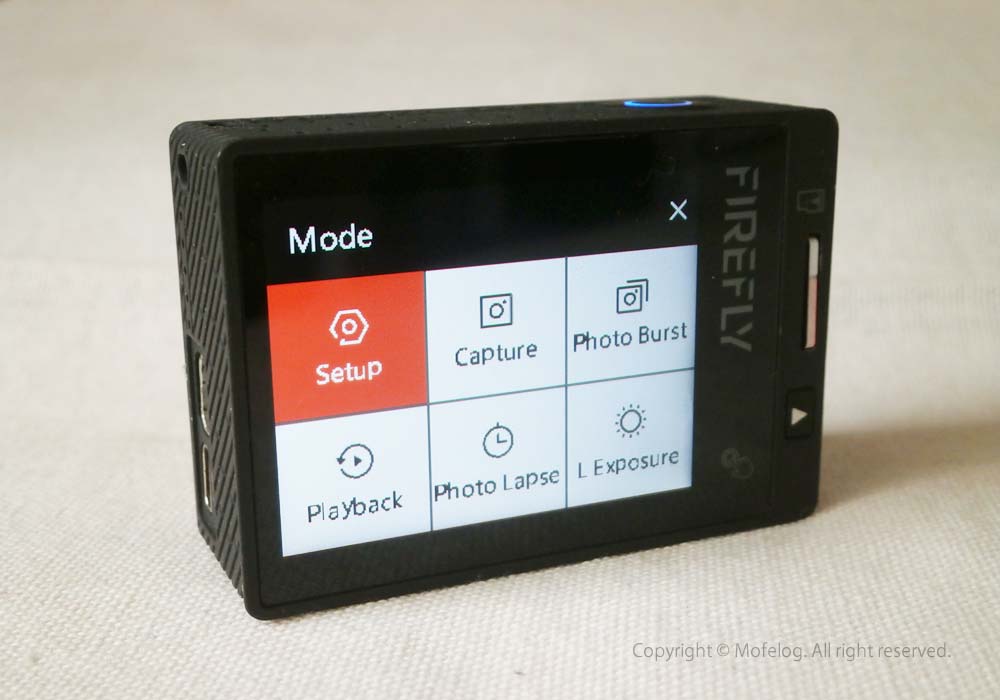
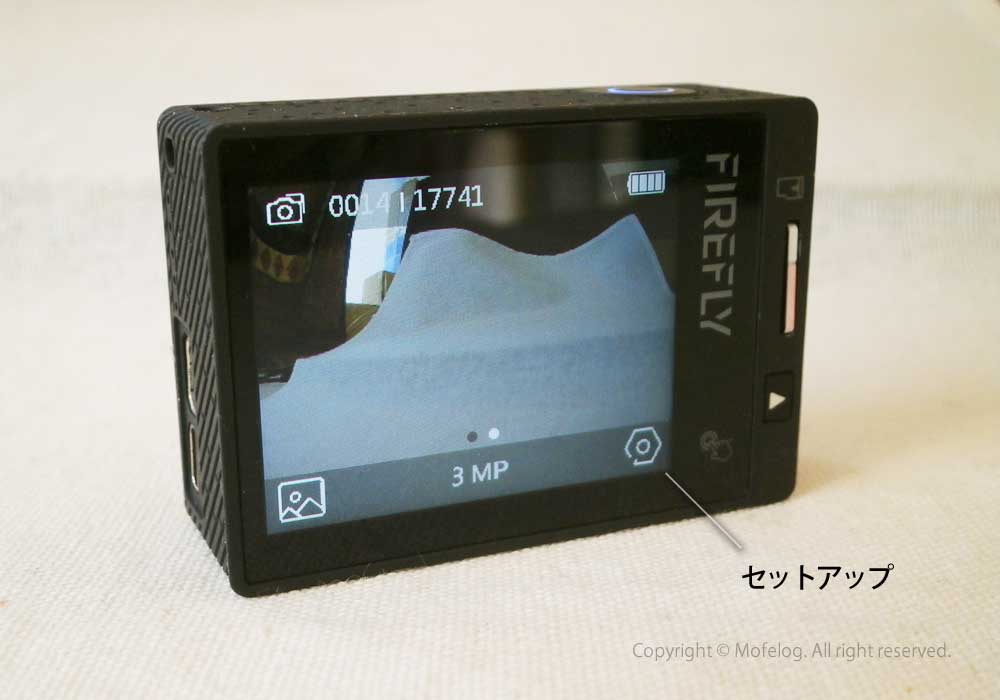
写真モードの設定メニューです。
| セットアップ |
写真カメラ機能の設定 |
| キャプチャー |
(撮影モード) |
| フォトブラスト |
(連写モード)設定された回数を連写します |
| プレイバック |
(再生モード)本体内に保存されている画像を見ることができます。
液晶画面右下の再生ボタンでも閲覧可能です
不要なデーターはOKボタンの長押しで削除するかどうか選べます。 |
| フォトラプス |
設定された時間ごとの静止画が撮影されます |
| L エクスポージャー |
(長時間露光)設定したシャッターのスピードの静止画が撮影されます |
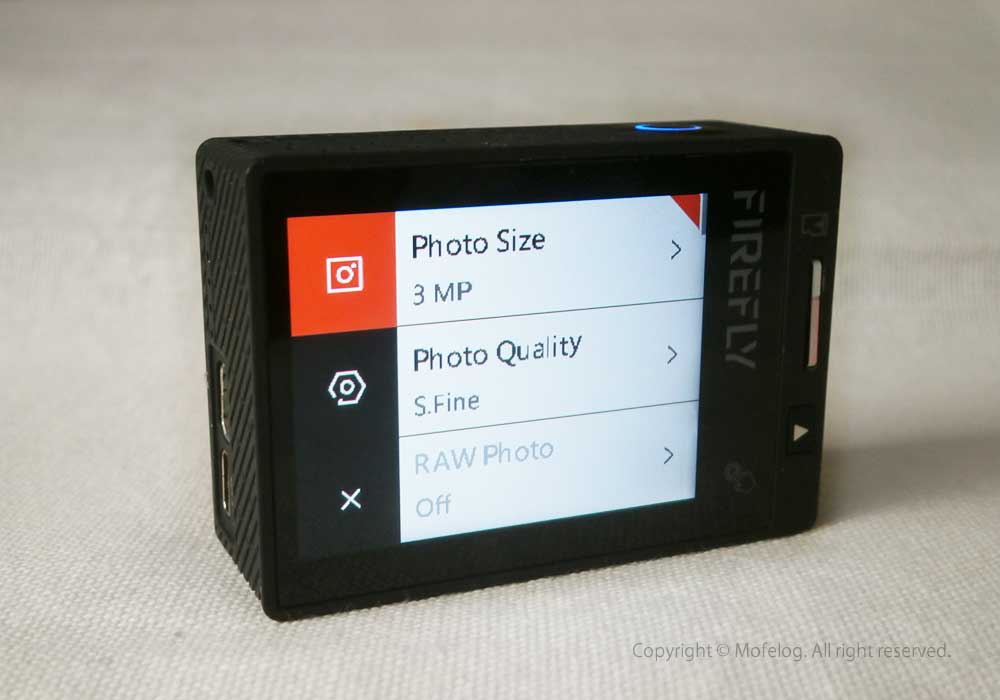
「Setup」をタップするか「OKボタン」を押すと写真機能の設定画面になります。

写真モードなので左上のマークが写真カメラになっています。その下のマークが「Firefly 8SE」本体の設定。その下のバツ印が「戻る」ボタンになっています。
また、電源を入れたあと、本体裏側のタッチパネル右下のギアマークをタップしても「写真」または「動画」設定の画面メニューになります。


タッチ画面から進んだ方が早く写真機能の設定画面に進めます。
「Firefly 8SE」写真モードの設定
下記は写真設定の項目についてです。ファームウェア、バージョンによっては内容が異なる場合があるようです。
| Photo Size |
画像サイズ
16M(4608 3456 4:3)
14M(4352 3264 4:3)
12M (4000 3000 4:3)
8.3M (3840 2160 16:9)
5M (2560 1920 4:3)
3M(2048 1536 4:3) |
| Photo Quality |
画像品質
S.Fine/Fine/Normal
|
| RAW Photo |
On / Off
|
| Long Exposure |
長時間露光
1/30 Second,1s,2s,5s,10s,30s,60s
シャッターの露光時間の設定をします。夜間撮影時などで使用しますが動くとぶれます。
撮影モード内の設定からLong Exposureを選んで待機しておく必要があります。
|
| Photo Stamp |
フォトスタンプ
Off / Date / Time / DateTime
画像に挿入する日時の表示内容を設定します。
|
| Logo Watermark |
ロゴウォーターマーク
On / Off
|
| Self Timer |
セルフタイマー
Off/1s/2s/3s/5s/10s/30s/60s
録画ボタンを押してからシャッターが切れるまでの時間を設定します。
通常はOffにしておきますが撮影時に録画ボタンを押すとぶれやすいので1秒などを選んでおくと手ぶれしにくくなります。
|
| Photo Burst |
連写
3p/s 5p/s 10p/s
一秒間当たりの連写の枚数を設定します。
撮影モード内の設定からBurstを選んで待機しておく必要があります。
|
| Photo lapse |
フォトラプス
1s/3s/5s/10s/30s/60s
タイムラプス画像の撮影タイミングを選びます。
こちらでは設定時間ごとの写真を記録してくれるので後で編集が必要です。
撮影モード内の設定からTimelapseを選んで待機しておく必要があります。
|
| Sharpness |
シャープネス
Strong / Normal
|
| AWB |
ホワイトバランス
Auto/Incandescent/D4000/D5000/Daylight/Cloudy/D9000/D10000/Flash/Fluorescent/Water/Outdoor
Incandescent=白熱/Daylight=昼光/Cloudy=曇り/Flash=フラッシュ使用時/Fluorescnt=蛍光灯/Water=水中/Outdoor=屋外
水中で使う場合はWater(水中モード)を選びます。
その他で気にならない場合はAutoで良いかと思います。
|
| EV Value |
露出補正
-2.0/-1.7/-1.3/-1.0/-0.7/-0.3/0.0/+0.3/+0.7/+1.0/+1.3/+1.7/+2.0
|
| ISO |
ISO感度
Auto/100/200/400/800/1600
|
| Metering |
測光
Center/Multi/Spot
|
ひとこと
以上「Firefly 8SE」写真カメラの設定方法でした。他に本体機能の設定と動画の設定についてもメモしておきたいと思います。
↓↓↓ よかったらどうぞ。
-
-
【アクションカメラ】FIREFLY 8SEの設定方法!本体編
アクションカメラのHawkeye Firefly 8SEの設定は、大まかに言うと本体の設定と動画(ビデオカメラ)設定と写真(カメラ)設定の3つあります。今回はFirefly 8SE本体機能の設定方法を個人的に備忘録としてメモしておきたいと思いま…
最後までお読みいただきありがとうございました。
スポンサーリンク


タイトルとURLをコピーしました